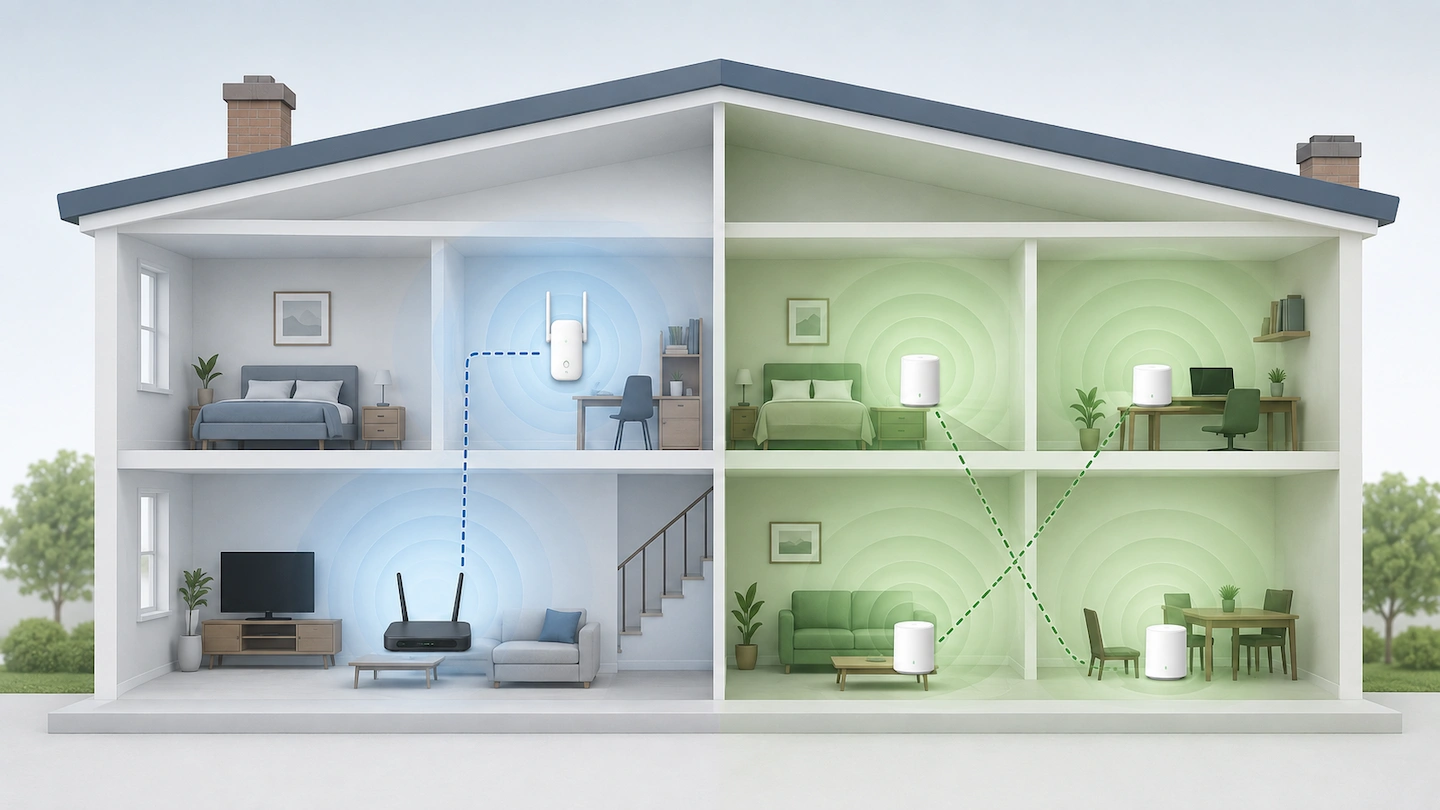
If you’re comparing mesh Wi-Fi vs Wi-Fi extender options, both can help with weak Wi-Fi in part of your home. But that does not mean mesh is automatically the better choice.
The main question is how much of your home actually has a coverage problem. If Wi-Fi is already good almost everywhere and one room is weak, an extender may be all you need. If several rooms or floors struggle, mesh Wi-Fi is more likely to make sense.
Quick answer: If most of your home already has good Wi-Fi and you only need to improve one particular area, a Wi-Fi extender may be enough.
If several rooms, floors or separated parts of the home have weak coverage, a mesh Wi-Fi system is usually the more suitable option.
Before buying either, check that Wi-Fi works properly when you are close to the router and that more than one device has the same problem. If the connection is poor everywhere, adding extra Wi-Fi coverage may not fix the real issue.
If Ethernet already reaches the weak area, a wired access point may also be worth considering.
Mesh Wi-Fi vs Wi-Fi Extender: The Difference in Plain English
Both options are designed to improve Wi-Fi coverage, but they approach the problem differently.
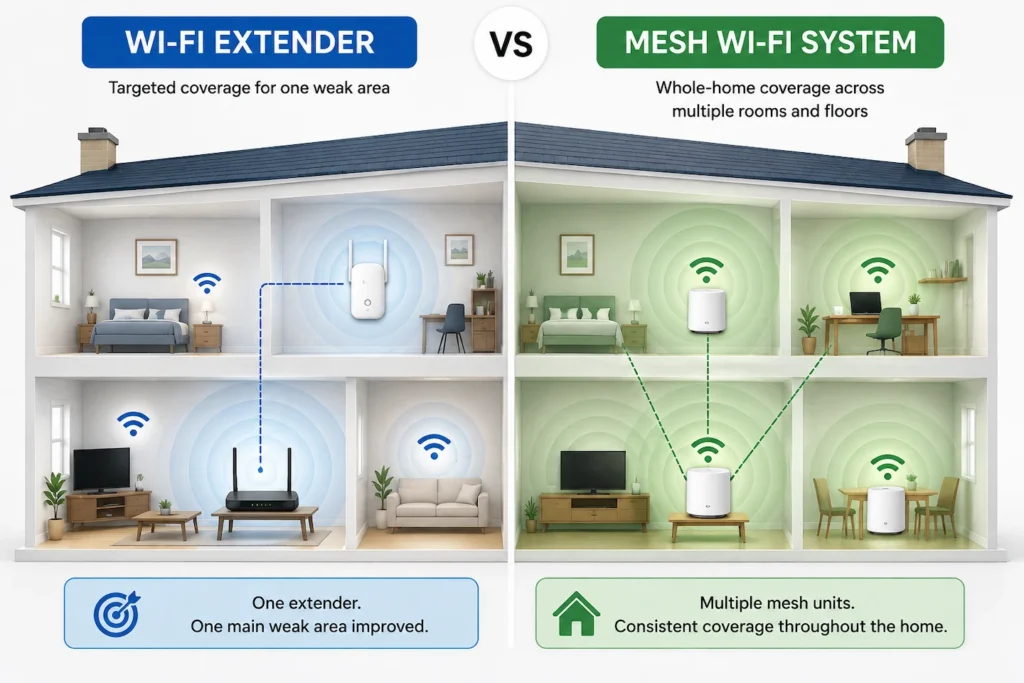
A Wi-Fi extender connects to your existing Wi-Fi and provides additional wireless coverage farther into the home. It is usually used to improve one particular weak area.
A mesh Wi-Fi system uses several Wi-Fi units, often called nodes or satellites, that are designed to work together across a wider area.
The practical difference for most home users is this:
- an extender is usually a targeted fix;
- mesh is usually a wider coverage solution.
Neither is automatically better in every home.
On mobile, swipe left or right to view the full comparison.
| Question | Wi-Fi extender | Mesh Wi-Fi |
|---|---|---|
| Best suited to | One main weak area | Several weak areas or wider coverage |
| Typical equipment | Usually one extra unit | Two or more coordinated units |
| Cost | Usually lower | Usually higher |
| Existing router | Usually stays in place | Depends on the system and setup |
| Placement matters | Yes | Yes |
| Network behaviour | Depends on the router and extender | Designed to work as a coordinated system |
| Expanding coverage later | Possible, depending on equipment | Usually designed with expansion in mind |
Before You Buy Either, Make Sure Coverage Is the Real Problem
It is easy to assume that weak or slow Wi-Fi means you need more Wi-Fi equipment.
Sometimes you do. But first, check whether the problem really follows the location rather than a particular device or the whole Internet connection. If the problem is mainly weak Wi-Fi in one room, work through those checks before buying extra equipment.
Check whether Wi-Fi works properly near the router
Take a phone, tablet or laptop that normally works reliably and use it reasonably close to the router.
If several devices work well there but become unreliable in the same distant room, that strongly points towards a coverage problem.
If Wi-Fi is poor even when you are close to the router, an extender or mesh system may not solve the underlying issue. If devices are connected to Wi-Fi but cannot get online, Wi-Fi Connected but No Internet: Is It the PC or the Router? can help you work out whether the problem is one computer, the router or the broadband connection.
Check whether the problem affects more than one device
If one laptop struggles in a room but phones, tablets and other devices work normally in exactly the same place, changing the whole home network would be premature.
That pattern suggests looking at the affected device first.
If several devices become weak or unreliable in the same part of the home, the location itself is much more likely to be the problem.
Check whether moving the router can help
Router position can make a noticeable difference to coverage.
If practical, avoid placing it:
- inside a cupboard;
- directly on the floor;
- behind large furniture;
- at the extreme end of the home;
- beside large metal objects or other equipment that can obstruct or interfere with Wi-Fi.
You do not need to redesign the room. Even a modest move into a more open or central position may improve coverage enough that additional hardware is unnecessary.
If your main problem is that Wi-Fi works downstairs but not upstairs, it is worth working through those basic checks before buying anything.
Choose a Wi-Fi Extender If You Have One Main Weak Area
A Wi-Fi extender makes the most sense when most of your home already has acceptable coverage.
For example, you may have reliable Wi-Fi throughout the house except for:
- one upstairs bedroom;
- a home office;
- a conservatory;
- a room at the opposite end of the property.
In that situation, replacing or expanding the whole network may be unnecessary.
An extender can provide a relatively simple way to reach that one area while keeping your existing router and network setup.
The extender still needs a good connection
An extender cannot create a strong connection from nothing.
It needs to be positioned somewhere that can still receive a usable Wi-Fi signal from the router while also reaching towards the area that needs better coverage.
NETGEAR gives similar placement guidance, recommending that an extender sits between the router and the weak area while it can still receive a strong connection from the router.
This is why putting an extender directly inside the dead zone often gives disappointing results. If the signal reaching the extender is already poor, there may be little useful connection for it to extend.
If an extender looks like the right option, the next step is to work out where to put a Wi-Fi extender before choosing its permanent location.
Choose Mesh Wi-Fi If Several Areas Need Better Coverage
Mesh becomes more attractive when the coverage problem is wider.
For example:
- several upstairs rooms are weak;
- both upstairs and the far end of the ground floor struggle;
- different parts of the home have separate dead spots;
- one extender cannot be placed where it reaches all the areas that need help.
Rather than relying on one additional wireless point, a mesh system is designed around several units working together.
This makes mesh particularly useful when you need to spread coverage across different parts of the property rather than fix one isolated weak room.
That does not mean every large or two-storey home needs mesh.
A two-storey house with good Wi-Fi almost everywhere may only need a small targeted improvement. A smaller property with thick walls or an awkward layout could have a much wider coverage problem.
Choose based on what your Wi-Fi is actually doing, not simply the size or number of floors in the home.
If mesh is the right fit for your home, Where Should You Put Mesh Wi-Fi Nodes? explains how to position the units so they maintain a good connection while extending coverage towards the areas that need it.
When a Wi-Fi Extender Probably Is Not Enough
There are situations where adding one extender is unlikely to be the cleanest solution.
Several separate areas have poor Wi-Fi
If you need better coverage in multiple directions from the router, one extender may improve one area while doing very little for the others.
At that point, a system designed for wider coverage starts to make more sense.
There is nowhere sensible to place the extender
A useful extender position needs two things:
- a reasonable Wi-Fi connection back to the router;
- useful reach towards the room or area that needs better coverage.
If every possible location is either too far from the router or too far from the weak area, an extender may simply not suit the layout.
You are trying to extend an already weak signal farther and farther
Adding more extenders is not automatically the answer.
If you find yourself trying to pass a connection through several wireless hops just to reach distant parts of the home, a better-designed whole-home solution may be more appropriate.
Does Mesh Wi-Fi Give You Faster Internet?
Not automatically.
It helps to separate broadband speed from Wi-Fi coverage.
Your broadband connection is the Internet service arriving at your home.
Wi-Fi is the wireless connection that carries that service between your router and devices.
If a laptop in an upstairs bedroom currently has a very weak Wi-Fi connection, improving the coverage may allow it to use more of the broadband speed that is already available.
In that sense, mesh could make the connection in that room feel considerably faster and more reliable.
But installing mesh does not automatically increase the broadband speed entering your home.
Ofcom makes the same distinction between home Wi-Fi and broadband: however good your Wi-Fi connection is, it cannot outperform the broadband service supplying it.
If your broadband service itself is the bottleneck, changing the Wi-Fi system cannot remove that limit.
The same principle applies to an extender.
What About Wi-Fi Network Names and Moving Around the House?
You may see mesh systems described as having one Wi-Fi network while extenders supposedly create a completely separate one.
That distinction is no longer reliable enough to use as a rule.
Mesh systems are designed so their different units operate together as part of a coordinated network.
Traditional extenders may create or use an extended network name, depending on how they are configured.
However, some newer extenders can work as part of a mesh network when the router and extender support the same compatible technology. For example, TP-Link documents compatible EasyMesh routers and range extenders working together as one unified Wi-Fi network.
The important word is compatible.
Do not assume that buying any extender and giving it the same Wi-Fi name automatically turns it into a mesh network. Equally, do not assume that every extender forces you to manually switch between completely separate networks.
Check what your exact router and extender support.
Mesh systems are generally designed to make moving around the home easier, but it is also best to avoid promises of perfectly seamless switching in every situation. The device you are using can influence when it changes from one Wi-Fi access point to another.
What If You Already Have Ethernet in the Weak Area?
If an Ethernet cable already reaches the room or floor with poor Wi-Fi, there is another option worth knowing about: a wired access point.
Instead of relying on a wireless connection back to the main router, the access point receives the network connection through Ethernet and provides Wi-Fi from that location.
This can be a very effective arrangement.
However, that does not mean most home users should start running new Ethernet cables through the house just because one bedroom has weak Wi-Fi.
It is most worth considering when suitable cabling already exists or when installing Ethernet is practical for another reason.
If the weak area is your home office, our Ethernet vs Wi-Fi for a Home Office guide can help you decide whether connecting the computer itself by cable would be worthwhile.
What Actually Matters When Choosing
It is easy to get distracted by Wi-Fi generations, maximum speeds and large coverage numbers on product boxes.
For this decision, a few practical factors matter more.
How much of the home has poor Wi-Fi?
This is the main question.
If there is one clear problem area, start by considering a targeted solution.
If there are several separate weak areas, mesh becomes much easier to justify.
Whether a useful extender position exists
Before buying an extender, think about where it could actually go.
There needs to be a suitable socket or position where it can still get a reasonable connection from the router while reaching towards the weak area.
If that position does not exist, choosing a more powerful-looking extender may not solve the basic problem.
Compatibility with your existing equipment
Features vary between routers, extenders and mesh systems.
This matters particularly if you want:
- one network name;
- coordinated roaming features;
- an extender to join an existing mesh system;
- your broadband provider’s router to remain part of the setup.
Check the specifications for the exact equipment rather than assuming all products behave the same way.
Whether Ethernet is available
Existing Ethernet can change the decision because it gives you the option of using a wired access point or, with suitable mesh hardware, a wired connection between units.
You do not need Ethernet to use most home mesh systems, but existing cabling can be useful.
Cost
An extender is usually the cheaper starting point.
That does not make it the better choice when several parts of the home need coverage.
Equally, the higher price of a large mesh system is difficult to justify if you only need to improve Wi-Fi in one bedroom.
Pay for the solution your coverage problem requires rather than the most advanced system available.
What Most Home Users Probably Do Not Need
You can usually ignore several things when making the initial decision.
The newest Wi-Fi standard just because it is newer
Wi-Fi 6, Wi-Fi 6E and Wi-Fi 7 can matter when choosing particular hardware, but they do not tell you whether an extender or mesh is the right type of solution.
Start with the coverage problem.
The largest advertised speed number
Maximum wireless figures on packaging are not a prediction of the Internet speed every device in your home will receive.
Real performance depends on the connection, distance, obstacles, interference, equipment and device being used.
A large mesh kit for one weak bedroom
If everything else already works well, this may be unnecessary.
Start with the simplest solution likely to fix the problem.
Several extenders before you have tested one properly
More wireless hardware does not automatically produce better Wi-Fi.
One correctly positioned extender may be enough for a targeted problem. If the problem is too widespread for that approach, consider whether mesh is a better fit rather than continually adding more extenders.
A router factory reset
A factory reset wipes settings and creates extra work.
It is not a sensible first response to a predictable coverage problem where Wi-Fi works normally close to the router.
Random advanced router changes
You also do not need to start changing channels, transmit power or other advanced settings simply because one distant room has weak coverage.
First establish whether this is genuinely a physical coverage problem.
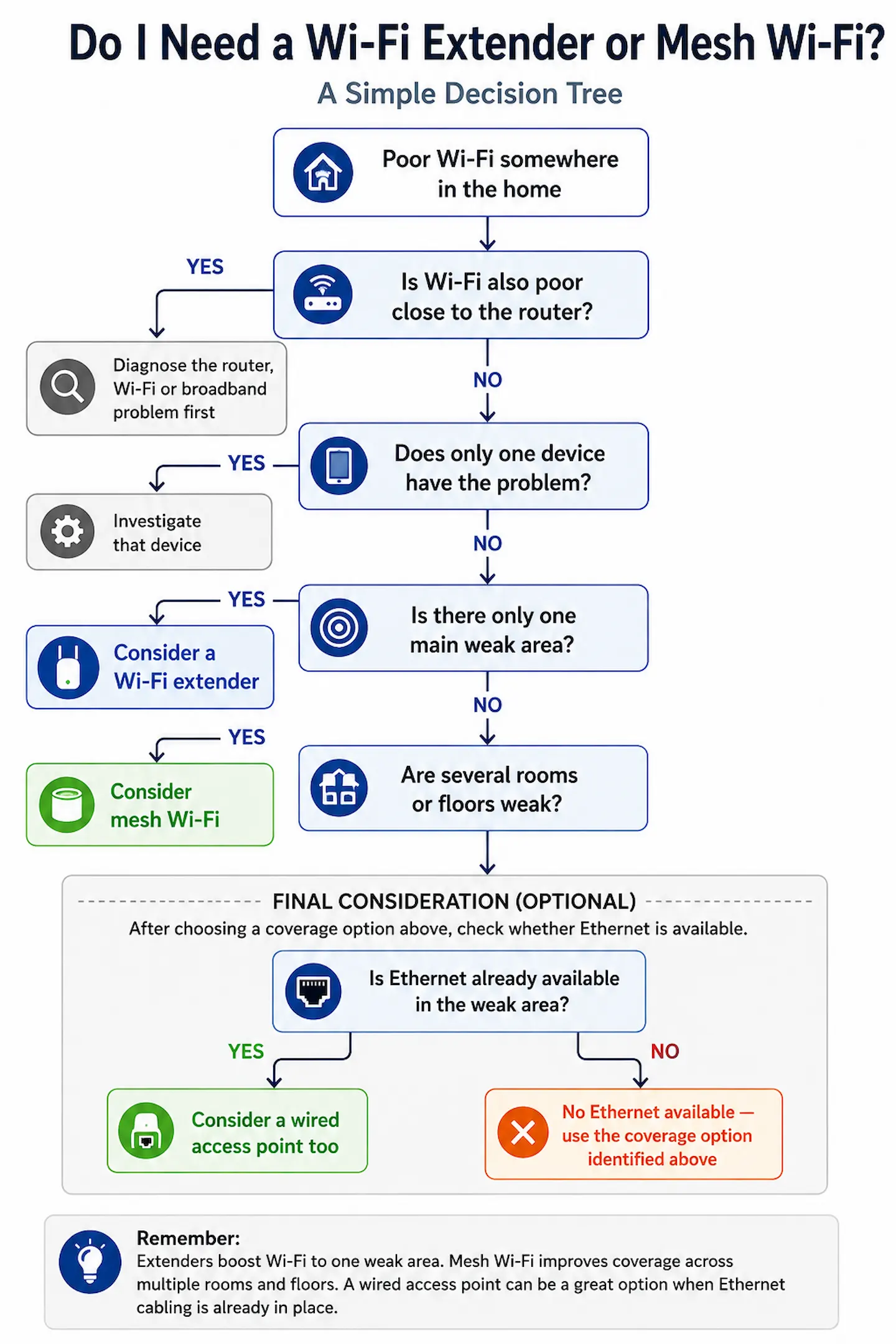
Mesh Wi-Fi or Wi-Fi Extender: Simple Decision Guide
Use what you have found around the home to choose the next step.
| What you find | Sensible next step |
|---|---|
| Only one device has poor Wi-Fi | Investigate that device first |
| Several devices are poor even close to the router | Diagnose the router, Wi-Fi or broadband connection first |
| One main room or small area is weak | Consider a Wi-Fi extender |
| Several rooms or floors are weak | Consider mesh Wi-Fi |
| There is no useful place for an extender | Mesh may be a better fit |
| Ethernet already reaches the weak area | Consider a wired access point |
| Moving the router fixes the problem | Buy nothing |
The important point is that mesh Wi-Fi does not automatically beat a Wi-Fi extender.
For one isolated coverage gap, an extender may be the simpler and more sensible solution. When weak coverage is spread across several parts of the home, mesh is usually easier to justify.
And if a free change such as moving the router solves the problem, you do not need either.
Frequently Asked Questions
Is mesh Wi-Fi better than a Wi-Fi extender?
Not in every situation.
Mesh is generally better suited to providing coverage across several rooms or parts of the home. A Wi-Fi extender can be perfectly adequate when you only need to improve one isolated weak area.
The better option is the one that fits the size and location of your actual coverage problem.
Do I need mesh Wi-Fi for a two-storey house?
No.
The number of floors does not determine the answer by itself.
If Wi-Fi works well throughout most of the property and only one upstairs room is weak, an extender may be enough. If several rooms on different floors struggle, mesh becomes more reasonable.
Test where the connection actually becomes weak before buying equipment.
Can I use a Wi-Fi extender with a mesh network?
Sometimes.
Some modern routers, mesh systems and extenders are designed to work together, but compatibility varies between manufacturers and models.
Check the documentation for your exact router and extender before assuming they can operate together as part of one coordinated network.