If you are comparing external SSD vs HDD for backups, both can be suitable choices.
The better choice depends less on which technology is newer and more on how much storage you need, where the drive will live, how often you will move it and whether faster transfers will make a practical difference.
Quick answer: For a backup drive that will mostly stay at home, an external HDD is often the better-value choice because you can usually get more storage for your money. An external SSD is more attractive if you regularly carry the drive around, want faster large backups and restores, or value a smaller portable drive with no moving mechanical parts. Both can fail, so whichever type you choose, avoid keeping the only copy of irreplaceable files on that one drive.
External SSD vs HDD for Backups: The Difference in Plain English
An HDD, or hard disk drive, stores data on magnetic spinning platters inside the drive. It contains moving mechanical parts.
An SSD, or solid-state drive, stores data in flash memory and has no moving mechanical parts.
That difference affects how the drives behave in everyday use.
External HDDs are generally cheaper for the same amount of storage, particularly as you move into larger capacities.
External SSDs are generally faster, smaller and better suited to regular movement because there are no spinning platters or moving read/write heads inside them.
For backups, however, this is not simply a choice between old and new technology.
The useful question is:
Which advantages will actually matter for the way you plan to use the drive?
SSD vs HDD for Backups: Quick Comparison
| What matters | External HDD | External SSD |
|---|---|---|
| Cost for the same capacity | Usually lower | Usually higher |
| Large-capacity storage | Often better value | Can become expensive |
| Transfer speed | Slower | Faster |
| Physical size | Usually larger | Usually smaller |
| Regularly carried around | Needs more care | Better suited |
| Noise | May be audible | Normally silent |
| Moving mechanical parts | Yes | No |
| Suitable for home backups | Yes | Yes |
There is no useful “reliability winner” to add to this table.
An SSD’s lack of moving mechanical parts is a real advantage when a drive is moved regularly, but that does not make every SSD more reliable than every HDD or guarantee that it will last longer.
Choose an External HDD If…
You Need Plenty of Storage Without Spending More Than Necessary
Capacity should usually come before maximum speed when you are choosing a backup drive.
If you have a large collection of:
- family photos;
- home videos;
- documents;
- music;
- creative projects;
- or backups from more than one computer;
you may need several terabytes of space.
HDDs generally provide more storage for the money than SSDs. That can make it easier to buy enough capacity for the files you already have while leaving room for future backups.
A faster drive is not much help if it becomes too small for your backups after a few months.
The Drive Will Mostly Stay at Home
An HDD can make particularly good sense when it spends most of its life somewhere safe, such as:
- beside a desktop computer;
- on a shelf;
- in a cupboard;
- or stored carefully between backups.
The mechanical parts inside an HDD make physical handling more important. External hard drives should be protected from drops, knocks and rough handling.
That does not mean an HDD is unsuitable for backups.
It means the portability advantage of an SSD matters much less if the backup drive rarely leaves the house.
You Do Not Mind Backups Taking Longer
SSD speed can be useful, but not every backup needs to finish as quickly as possible.
If you connect the drive, start a backup and leave it running while you do something else, saving a few minutes may not justify paying substantially more for the drive.
The first large backup may take longer on an HDD, and restoring a large collection of files may also be slower.
But for a drive mainly used for periodic home backups, that may be a perfectly acceptable trade-off.
For many home users, an external HDD remains a sensible backup choice rather than a second-rate alternative to an SSD.
Choose an External SSD If…
You Regularly Carry the Drive Around
Portability is one of the clearest reasons to consider an SSD.
Because an SSD does not contain spinning platters or other moving mechanical storage parts, it is better suited to a drive that is regularly carried between locations.
That could include someone who:
- takes a backup drive between home and another location;
- carries it with a laptop;
- moves it between several computers;
- or regularly puts it in a bag.
An SSD can still be damaged, lost or fail electronically, so it should still be handled sensibly.
The point is simply that regular physical movement is less of a concern than it is with a mechanical HDD.
Faster Backups and Restores Matter to You
An SSD becomes more attractive when you regularly transfer large amounts of data.
For example, the speed difference may be useful if you often:
- back up large photo libraries;
- copy video projects;
- move hundreds of gigabytes at a time;
- restore large folders;
- or use the same external drive for other large file transfers as well as backups.
SSDs can transfer data substantially faster than mechanical hard drives when the rest of the connection supports that speed.
The key phrase is when the rest of the connection supports it.
A fast SSD connected through a slower USB connection will not necessarily achieve the headline speed printed on the box.
You Are Happy to Pay More for the Capacity You Actually Need
Do not compare a small SSD with a much larger HDD and then choose the SSD simply because it is faster.
First decide how much storage you need for a computer backup
Then compare the cost of an HDD and SSD at roughly that capacity.
For example, if your backups genuinely require several terabytes, buying a much smaller SSD merely to stay within budget could leave you short of storage.
SSD is easiest to justify when you can afford the capacity you need and its speed or portability solves a real requirement.
Which Specifications Actually Matter for a Backup Drive?
Product descriptions can make external storage look more complicated than it needs to be.
For most home users, five things deserve most of the attention.
Capacity
Start here.
Your backup drive needs enough space for the files you want to protect.
It is also sensible to leave some room for:
- new photos and videos;
- additional documents;
- future projects;
- and any extra versions retained by your chosen backup method.
There is no single correct capacity for everybody.
Someone backing up a modest collection of documents may need far less space than someone with years of family videos.
The important point is to buy for the amount of data you actually need to protect, rather than starting with a particular SSD or HDD model.
Transfer Speed
Speed matters more when the amount of data being moved is large.
A faster drive can reduce the time needed for:
- the first backup;
- large subsequent backups;
- and restoring large quantities of data after a problem.
But maximum speed is not automatically the most important specification.
If the drive is mainly used for occasional unattended backups, extra speed may make little practical difference to you.
The USB Connection
An external drive does not work in isolation.
Transfer performance also depends on the connection between the drive and computer.
That can include:
- the USB port on the computer;
- the drive’s own interface;
- the cable;
- and any hub or docking station in between.
You do not need to become an expert in every USB version.
Before paying substantially more for a very fast external SSD, simply check that your computer has a suitable connection and that the extra performance will actually be useful.
Physical Size and Portability
If the drive lives beside one computer, its physical size may barely matter.
If it travels regularly, a smaller SSD can be much more convenient.
This is a good example of why the “best” choice depends on use rather than specifications alone.
Price at the Capacity You Need
Compare like with like.
Instead of asking:
Which drive is cheaper?
Instead, ask:
What does the amount of storage I actually need cost as an HDD and as an SSD?
This keeps the buying decision tied to your backup needs rather than letting a specification sheet make the decision for you.
What About Reliability and Lifespan?
Reliability is where SSD-versus-HDD advice can become misleading.
It is tempting to reduce the question to:
Which one lasts longer?
There is no dependable answer that applies to every drive.
HDDs Have Mechanical Parts
A hard drive contains spinning platters and moving mechanical components.
Those components mean physical shocks and rough handling matter.
That is why external HDDs should be protected from drops, jolts and rough treatment.
For a portable drive that is moved every day, that is a legitimate reason to favour SSD.
For a backup HDD that spends most of its life safely at home, it is less decisive.
SSDs Have No Moving Parts
An SSD avoids the mechanical head-and-platter system used by an HDD.
This makes SSD particularly attractive for portable storage.
But an SSD is not failure-proof.
It still relies on flash memory, a controller, firmware and other electronic components. A failed SSD can still make the files on it inaccessible.
The lack of moving parts should therefore be treated as a practical advantage, not a guarantee that your data is safe.
Do Not Rely on Simple Lifespan Claims
Be cautious about rules such as:
- “HDDs only last three years”;
- “SSDs last ten years”;
- or any other fixed replacement date presented as a certainty.
Drive life varies with the individual device, usage, physical treatment, environmental conditions and the particular way a device eventually fails.
Trying to predict which storage technology will survive longest is not a strong backup strategy.
A better approach is to assume that either type of drive could eventually fail and make sure that losing that one device would not remove your only copy of something important.
What Most Home Users Probably Do Not Need
It is easy to spend a long time comparing specifications that have very little effect on an ordinary home backup.
For most people, there is little need to choose a backup drive primarily from:
- NAND flash types;
- SSD TBW endurance figures;
- detailed benchmark charts;
- NVMe versus SATA terminology;
- maximum theoretical USB speeds;
- enterprise storage statistics;
- or detailed HDD rotational-speed comparisons.
Those specifications can matter for specialist workloads.
They are rarely the best starting point for backing up family photos, documents and everyday personal files.
Start with:
capacity → where the drive will live → how much it will be moved → whether speed matters → price.
That will usually lead to a more useful choice.
Remember: One External Drive Is Not the Whole Backup Strategy
Choosing between SSD and HDD matters less than making sure important files do not exist in only one place.
A simple example is:
Original files kept on the computer + a separate copy on the external drive = two copies
But:
Move your files to the external drive + delete the originals from the computer = one copy
Once you have chosen a suitable drive, How to Back Up Files to an External Drive in Windows 11 shows how to create a separate copy using File Explorer or set up ongoing backups with File History.
The second arrangement gives you more free space on the computer, but the external drive now contains the only copy.
If you want to build on that idea, What Is the 3-2-1 Backup Rule for Home Users? explains how local and offsite copies can work together so one failed or lost drive does not remove every copy of an important file.
If you already use Microsoft’s cloud storage, our guide to whether OneDrive is really a backup explains how cloud synchronisation differs from keeping another independent recovery copy.
You do not need an elaborate business backup system for every replaceable file.
But if losing something permanently would really matter, make sure one failed, damaged or lost external drive cannot remove your only copy.
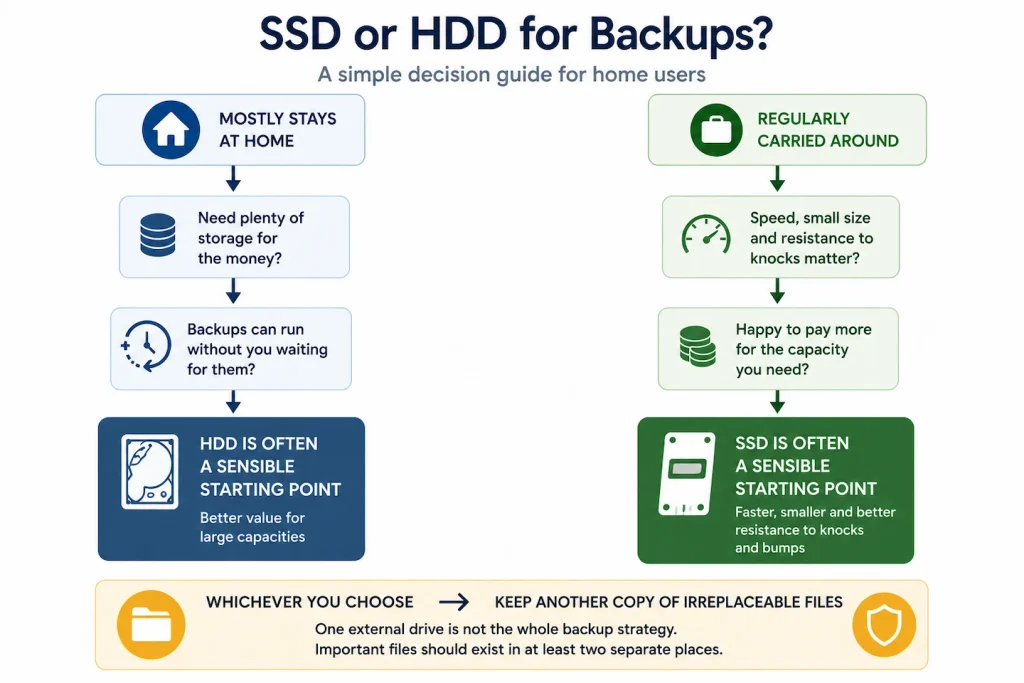
External SSD or HDD for Backups: A Simple Decision Guide
| Your situation | Start with |
|---|---|
| Drive will mostly stay at home | HDD |
| Need lots of storage for the money | HDD |
| Backups can run without you waiting for them | HDD |
| Drive will travel regularly | SSD |
| Small and light matters | SSD |
| Regularly transfer large files | SSD |
| Faster restores are important | SSD |
| Important files exist in only one place | Fix the backup strategy first |
For many home users, an external HDD remains perfectly adequate for a backup drive that stays at home and provides plenty of storage at a sensible cost.
An SSD is worth considering when portability and faster transfers provide a genuine practical benefit.
Whichever you choose, having enough capacity and keeping more than one copy of irreplaceable files matters more than buying the newest storage technology.