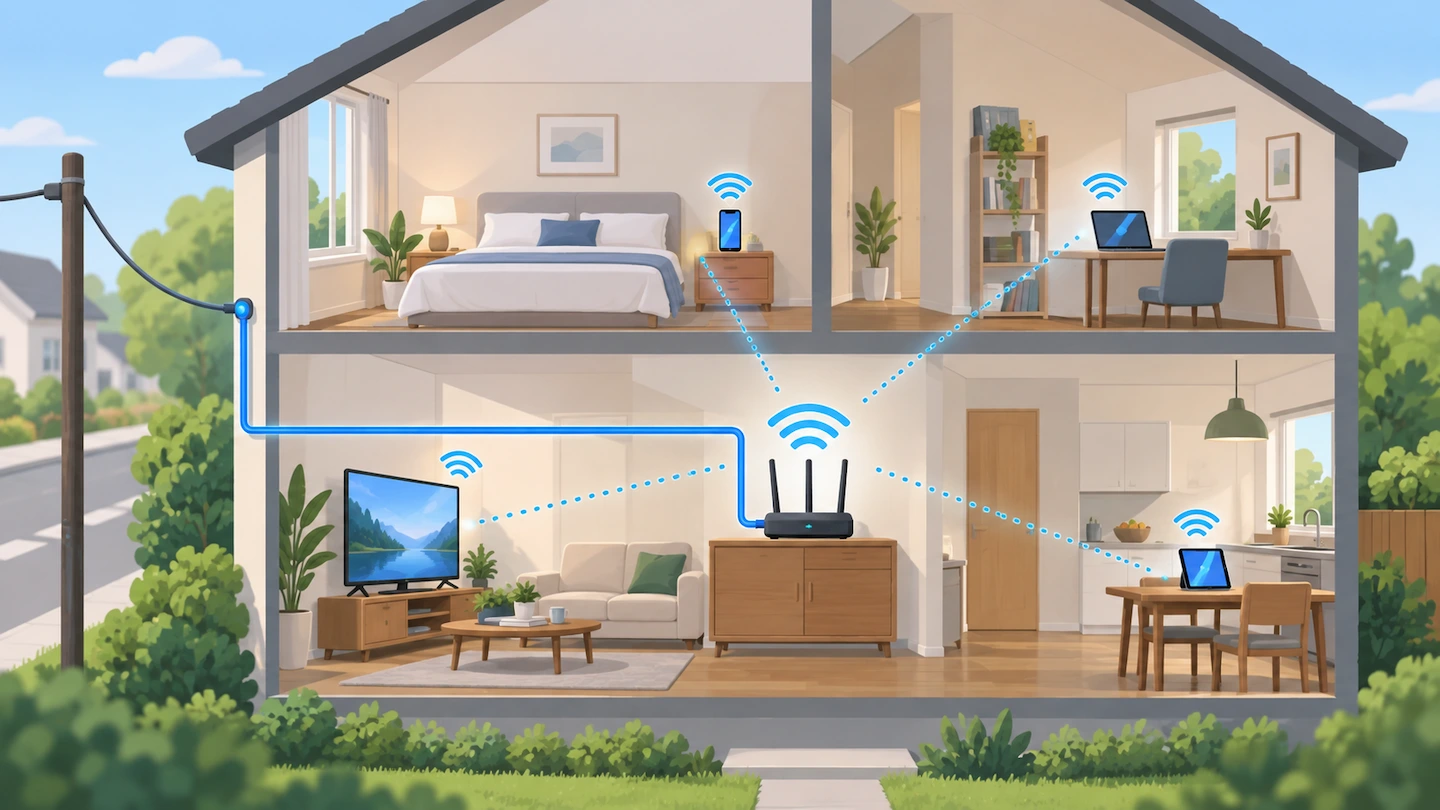
When the internet feels slow, it is easy to blame the Wi-Fi. But the slowdown could be coming from your broadband connection, the Wi-Fi connection inside your home, or even one particular computer or phone.
Before changing router settings, buying extra Wi-Fi equipment or contacting your broadband provider, it helps to work out where the slowdown is actually happening.
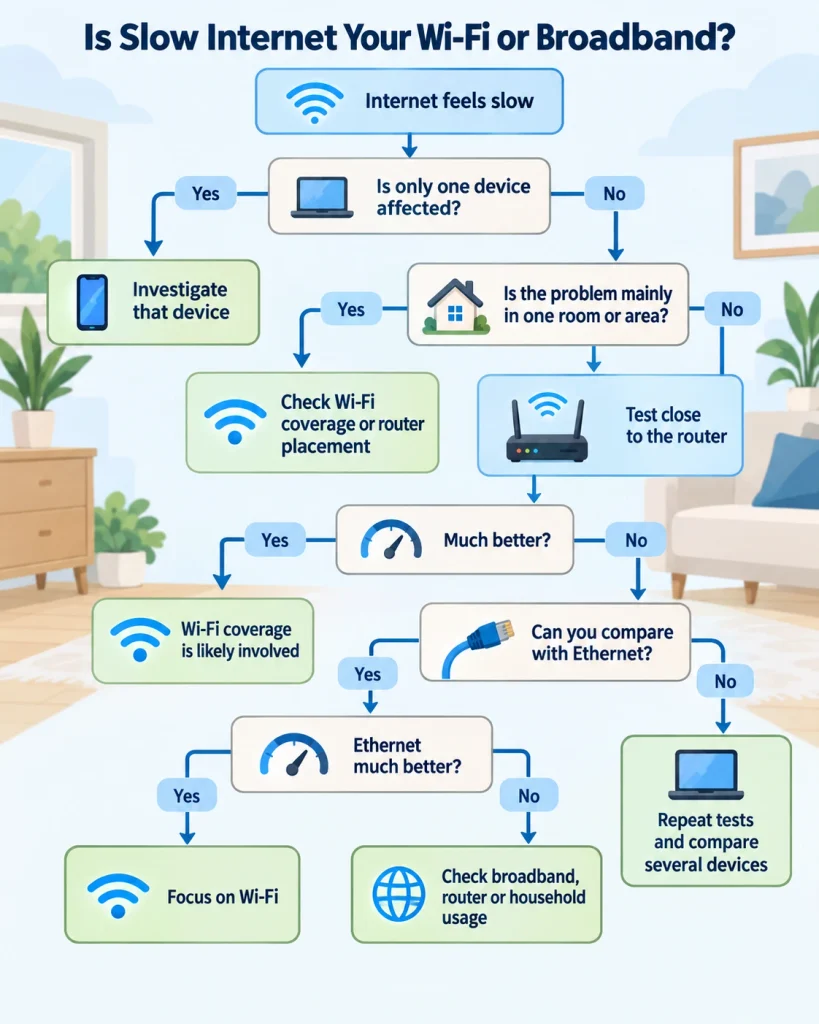
Quick answer: Start by checking whether the problem affects one device, one part of the house or everything.
Then:
- Compare another device in the same place.
- Test the affected device close to the router.
- If practical, compare Wi-Fi with a direct Ethernet connection.
- Repeat any surprising result before drawing conclusions.
If only one device is slow, investigate that device first. If performance improves a lot near the router, Wi-Fi coverage is probably involved. If Ethernet performs normally but Wi-Fi is much slower, focus on the Wi-Fi side of the network.
If several devices are slow even close to the router or over Ethernet, the broadband connection, router or shared household usage becomes more likely.
These comparisons help narrow down the problem. They do not always prove that one particular device or service is faulty.
Wi-Fi and broadband are not the same thing
For home troubleshooting, it helps to think of the connection like this:
Broadband service → router → Wi-Fi or Ethernet → your device
Your broadband service brings internet access into your home.
Your Wi-Fi connection carries that connection wirelessly from the router to your laptop, phone, television and other devices.
That means you can have perfectly adequate broadband reaching the router but poor Wi-Fi in part of the house. You can also have a good wireless connection to the router while the internet connection beyond it is still slow.
A strong Wi-Fi signal does not by itself tell you whether the broadband connection is fast.
Ofcom’s broadband and Wi-Fi guidance also makes this distinction and notes that distance, obstacles and the device itself can affect Wi-Fi performance.
First, find out how widespread the slowdown is
Before running lots of speed tests, work out how many devices and locations are affected.
This is often the quickest way to narrow down the cause.
Only one device is slow
Try another phone, tablet or computer in roughly the same place.
If the second device works normally while the first remains slow, that points away from a general broadband or whole-home Wi-Fi problem.
The first device may have its own connection or software issue.
Do not start changing router settings just because one laptop is struggling while everything else works normally.
One room or part of the house is slow
If several devices work properly near the router but become noticeably slower in one room, upstairs or at the far end of the house, the Wi-Fi connection inside the home is more likely to be involved.
Distance, walls, floors and router position can all affect wireless performance.
If the problem consistently follows one particular location, Weak Wi-Fi in One Room: What Usually Causes It? explains how to narrow down a local coverage problem without immediately buying extra equipment.
This is different from having slow broadband throughout the home.
Everything seems slow
If several devices are slow in different parts of the house, keep testing.
At this point, the broadband connection, router or heavy household internet use becomes more relevant, but it is still worth making a few comparisons before deciding which is responsible.
Make your speed comparison more reliable
A speed test is most useful when you compare results under reasonably similar conditions.
Before testing, where practical:
- pause large downloads or game updates;
- avoid running a large cloud backup;
- consider whether somebody else is streaming or downloading heavily;
- use the same device when comparing different locations;
- repeat a result that looks unusually high or low.
Virgin Media’s slow internet guidance similarly recommends reducing other internet activity when testing and comparing different devices or connections.
You do not need laboratory conditions. The aim is simply to avoid blaming Wi-Fi or broadband for a slowdown that is actually being caused by something else using the connection at that moment.
Test again close to the router
Take the device that feels slow and test it in the same room as the router.
If you are using a speed-testing service, use the same service for both tests.
The important question is not whether the two numbers are exactly the same.
Ask:
Does performance improve significantly when the device is close to the router?
If it becomes much faster
That is a useful sign that the Wi-Fi connection between the router and the original location is contributing to the problem.
Possible reasons include:
- distance from the router;
- walls or floors between the router and device;
- poor router placement;
- local interference.
If the router itself is low down, enclosed, blocked by large objects or positioned at one edge of the home, Where Should You Put Your Wi-Fi Router at Home? explains what is worth changing before considering extra hardware.
You do not yet need to buy an extender or mesh system. First establish whether simple placement or coverage issues explain the problem.
If it is still slow beside the router
Do not immediately conclude that your broadband provider is at fault.
The next useful comparison, if you can make it, is Wi-Fi versus Ethernet.
Compare Wi-Fi with Ethernet if you can
Ethernet connects a computer directly to the router using a network cable instead of Wi-Fi.
That makes it useful for diagnosis because it removes most of the wireless part of the connection from the test.
If your computer does not have an Ethernet socket, you may need a compatible adapter. There is no need to buy one just to run this test if you can already get a useful diagnosis from other devices and locations.
If you are unsure about the wider differences between the two connection types, Ethernet vs Wi-Fi for a Home Office: Which Is Better? explains them in more detail.
If Ethernet is much faster than Wi-Fi
That suggests the incoming broadband connection is capable of delivering better performance than the affected Wi-Fi connection is currently giving you.
Focus on the Wi-Fi side first.
That might mean looking at:
- router placement;
- distance;
- obstacles;
- Wi-Fi coverage.
If the slowdown mainly affects one room or area, concentrate on coverage and router placement rather than changing advanced router settings or buying extra hardware.
If Ethernet is also slow
That makes poor Wi-Fi coverage a less convincing explanation for the whole problem.
Possible areas to investigate now include:
- the broadband service;
- the router;
- heavy internet use elsewhere in the home;
- the testing device;
- the Ethernet cable or adapter;
- a temporary provider or network problem.
A slow Ethernet test does not automatically prove that the broadband provider is at fault.
It simply tells you that Wi-Fi alone does not explain the result.
What your test results probably mean
Use the overall pattern rather than relying on one speed-test number.
| What you find | What to investigate first |
|---|---|
| One device is slow but others are fine | The affected device |
| Several devices are slow only in one room | Wi-Fi coverage or router placement |
| Wi-Fi improves significantly close to the router | Wi-Fi coverage or placement |
| Wi-Fi is slow but Ethernet performs normally | The Wi-Fi side of the home network |
| Several devices are slow on Wi-Fi and Ethernet | Broadband, router or shared household usage |
| Performance drops mainly when several devices are busy | Shared connection demand |
| Results vary considerably at different times | Repeat the tests and look for a pattern |
| Speed test looks reasonable but calls or games still lag | Something other than raw download speed may be involved |
These are diagnostic clues, not absolute proof of a particular fault.
If one device is much slower than the others
Suppose your laptop is slow but your phone works normally in the same room.
That is important information.
Because another device can use the same Wi-Fi connection successfully from the same location, there is less reason to begin by changing router position, upgrading broadband or buying extra Wi-Fi hardware.
Concentrate on the affected device instead. Wi-Fi Slow on One Device but Fine on Others: What to Check walks through the device-specific checks in a sensible order.
If Wi-Fi is slow but broadband appears fine
If your tests point towards the wireless side of the network, look at where the slowdown occurs.
If performance is good close to the router but poor elsewhere, coverage and router placement are sensible places to investigate.
If the router’s position itself looks questionable, Where Should You Put Your Wi-Fi Router at Home? explains the positioning checks worth making first.
Do not jump straight to buying an extender, mesh system or new router. First establish that poor Wi-Fi coverage is actually the problem.
Sometimes moving the router to a more open and central position is enough to make a noticeable difference.
If everything is slow, including Ethernet
If several devices are slow and a wired connection is also performing poorly, broaden the investigation.
Start with the simple checks:
- Repeat the test to make sure the result is consistent.
- Check whether large downloads, backups or streaming are running elsewhere.
- Test another device if possible.
- Check your broadband provider’s service-status page for a known problem.
- Compare the results with the sort of service your broadband package is supposed to provide.
EE’s broadband-speed guidance separates the speed reaching the hub from the speed received by the device, which is a useful distinction when diagnosing this kind of problem.
You still do not need to start factory-resetting the router, reinstalling network drivers or changing advanced network settings.
Those are more disruptive steps and should only be considered when simpler comparisons have already narrowed down the problem.
If your devices show that they are connected to Wi-Fi but cannot access the internet at all, that is a slightly different problem. Wi-Fi Connected but No Internet: Is It the PC or the Router? walks through that situation separately.
What if the speed test looks fine but the internet still feels slow?
Download speed is not the only thing that affects how an internet connection feels.
You might see reasonable speed-test results but still notice:
- delays during video calls;
- online games responding slowly;
- a particular website taking a long time to respond;
- brief pauses before pages start loading.
Delay between your device and an online service — often called latency — can matter as well as download speed.
A problem with one website or online service can also make the internet feel slow even when your home connection is working normally.
So a good speed-test result does not rule out every possible connection problem.
The useful question remains:
Does the problem affect everything, or only a particular device, location or service?
What to do next
By this point, you should have a much clearer idea of which part of the connection deserves attention.
If only one device is affected:
Troubleshoot that device rather than changing the whole network.
If one room or floor is affected:
Investigate Wi-Fi coverage and router placement.
If Wi-Fi is poor but Ethernet is normal:
Concentrate on the wireless connection inside the home.
If several devices are slow even over Ethernet:
Look more closely at the router, broadband service, household usage and your provider’s service status.
If the problem comes and goes:
Repeat the same comparisons at different times and look for a consistent pattern.
The main thing is not to start replacing hardware or upgrading your broadband package until you know which part of the connection is actually holding you back.