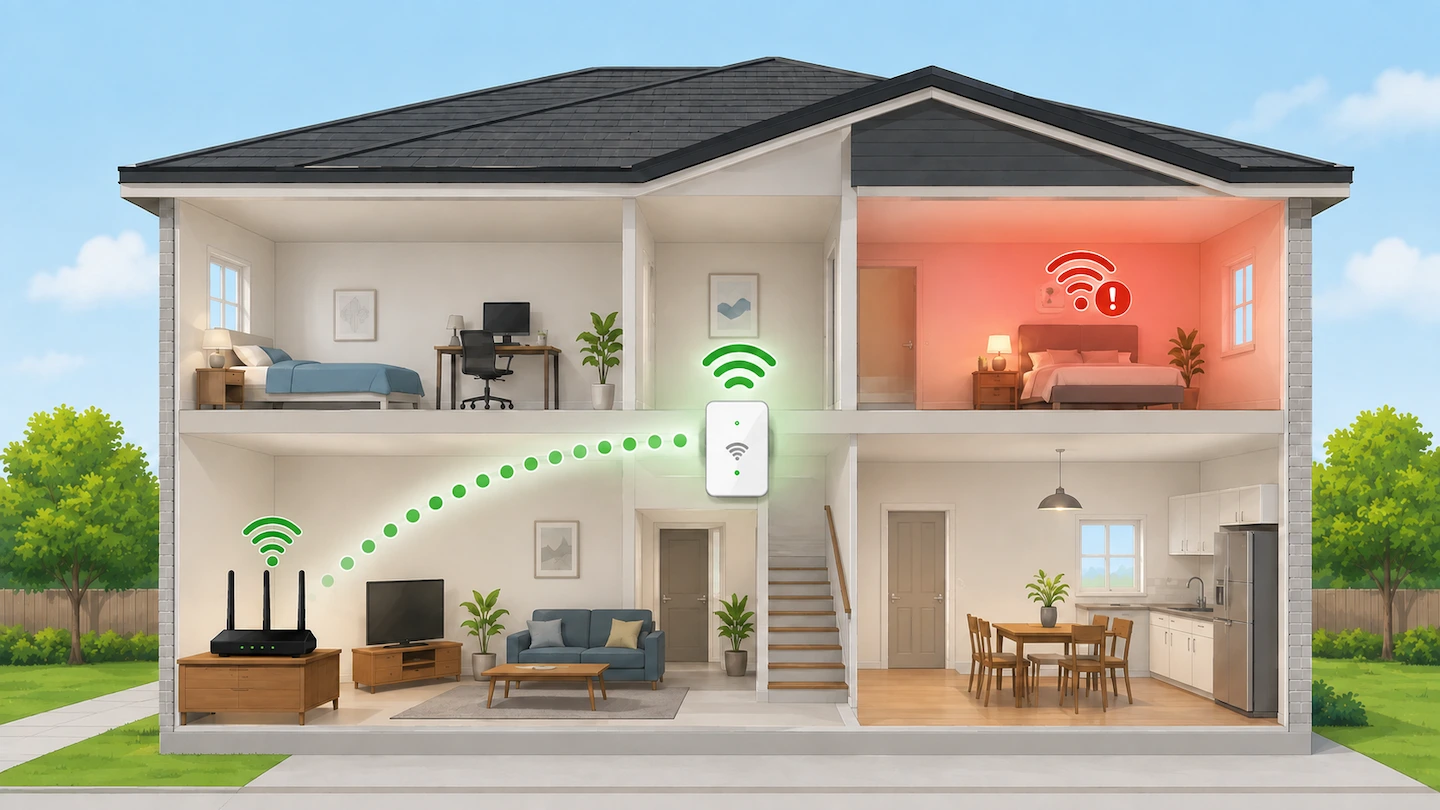
If you are trying to work out where to put a Wi-Fi extender, do not simply plug it into the room where your Wi-Fi is weakest.
A better starting point is somewhere between your router and the weak area, where the extender can still receive a good Wi-Fi signal from the router. From there, you can test nearby sockets until you find a position that improves the area you actually want to use.
Quick answer: Start by placing your Wi-Fi extender roughly halfway between the router and the area with weak Wi-Fi. The halfway point is only a starting position — the extender still needs a good connection back to the router. If its signal light or app shows that the router connection is weak, move the extender closer to the router. Once that connection is good, test Wi-Fi in the room you want to improve.
Where to Put a Wi-Fi Extender in Your Home
A Wi-Fi extender works best when it can do two things at the same time:
- receive a usable Wi-Fi signal from your router;
- extend that connection towards the part of your home where Wi-Fi is weak.
Think of the extender as a stepping stone between the router and the problem area:
Router → Wi-Fi extender → weak area
If you put the extender too close to the router, it may have an excellent connection but provide little extra reach.
If you put it too far away, the extender itself may receive a weak connection from the router. It cannot make a poor incoming Wi-Fi signal good simply by repeating it.
Both TP-Link and NETGEAR recommend starting at roughly the halfway point between the router and the area with poor Wi-Fi, while keeping the extender within useful range of the router.
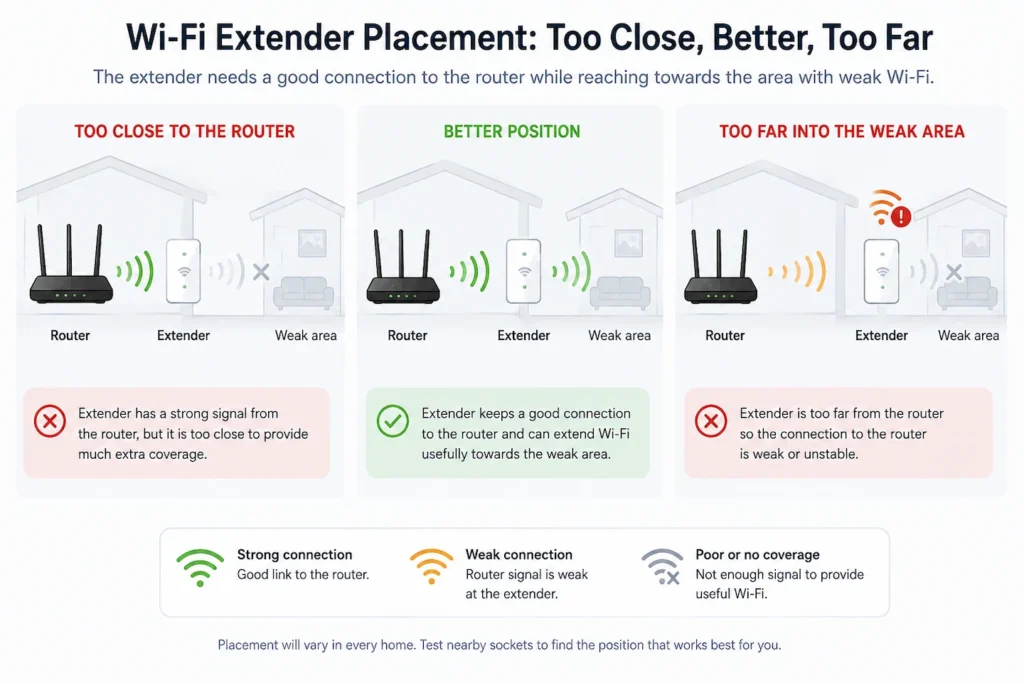
Start Roughly Halfway Between the Router and the Weak Area
You do not need to measure the exact distance between your router and the problem room.
“Halfway” is a practical starting point rather than a rule.
For example, if your router is in the living room and Wi-Fi is poor in a bedroom at the other end of the house, look for a suitable socket somewhere between the two.
Then check whether the extender still has a good connection to the router.
Walls, floors and other obstacles can weaken Wi-Fi as it travels around the home, so the physical halfway point is not always the best position. TP-Link’s placement guidance specifically notes that obstacles can affect where an extender should be positioned.
If you have to choose between putting the extender slightly closer to the router or putting it somewhere the router signal is already very weak, start with the position closer to the router.
How to Find the Best Socket for Your Wi-Fi Extender
The easiest way to find a good position is to start with one sensible location and make small changes from there.
1. Choose a socket around the halfway point
Look for a socket somewhere between your router and the area you want to improve.
It does not need to be exactly halfway.
Plug the extender in and give it time to reconnect to your router. If you have only just bought the extender, complete its normal setup first by following the instructions for your model.
Why this matters: starting around halfway gives the extender a reasonable chance of reaching both the router and the problem area without assuming that the first socket will be the final position.
2. Check the extender’s connection to the router
Many Wi-Fi extenders have a signal or connection light that helps show the quality of their connection back to the router. Some manufacturers also provide this information through an app.
Check the instructions for your particular extender to find out what its lights or app are telling you.
Do not assume that a particular colour always means the same thing. The indicators vary between manufacturers and models.
For example, TP-Link uses signal LEDs on many of its extenders to help with positioning, while NETGEAR models may use a Router Link or Link Status indicator.
The important question is:
Does the extender itself still have a good connection to the router?
Do not judge the position only by the Wi-Fi signal shown on a phone or laptop sitting next to the extender. You also need to know whether the extender has a suitable connection back to the router.
3. If the router connection is weak, move the extender closer
If the extender shows a poor connection to your router, move it to another suitable socket closer to the router.
Then give it time to reconnect and check the indicator again.
TP-Link’s placement guidance similarly advises moving an extender closer to the router when its signal indicator shows that the connection is poor.
This can feel counter-intuitive if the room you are trying to improve is farther away.
However, moving the extender deeper into an area where the router signal is already weak usually gives the extender less useful signal to work with.
Why this matters: the extender needs a reliable connection back to the router before it can provide useful coverage farther away.
4. Test Wi-Fi in the area you actually want to improve
Once the extender has a good connection to the router, go to the room or area where Wi-Fi was poor.
Use the same phone, tablet or laptop you normally use there.
Try the sort of activity that was giving you trouble, such as:
- opening familiar websites;
- streaming a video;
- using an app or online service;
- making a video call.
You can run a speed test if you find that useful, but you do not need to chase a particular number.
The more useful question is:
Is the connection now noticeably more usable in the place where you need it?
If it is, there is no need to keep moving the extender simply to find a theoretically perfect position.
5. Try one nearby socket at a time if necessary
If the extender has a good connection to the router but the weak area has not improved enough, try another suitable socket nearby.
You may be able to move it slightly farther towards the weak area while keeping a good connection back to the router.
After each move:
- wait for the extender to reconnect;
- check its router connection;
- return to the weak area;
- test again using the same device.
Change one thing at a time.
If you move the extender, change router settings and test with a different device all at once, it becomes harder to tell which change actually helped.
Where to Put a Wi-Fi Extender in a Two-Storey House
The same principle applies if the router and weak area are on different floors.
Do not automatically put the extender upstairs simply because the upstairs Wi-Fi is poor.
Instead, look for an intermediate position where the extender can still receive a good signal from the router while reaching towards the upstairs area.
Depending on the layout of your home, a suitable place to test might be:
- a hallway between the router and the stairs;
- a socket near the stairs;
- an upstairs landing;
- another open position between the router and the problem room.
These are starting points, not guaranteed best locations.
A landing may work well in one home and poorly in another because building layout, walls, floors and router position are different.
Use the same test as before:
Does the extender have a good connection to the router, and does it noticeably improve Wi-Fi where you need it?
If the answer to both is yes, the position is good enough.
If your main problem is that Wi-Fi works downstairs but not upstairs and you are not yet sure whether an extender is actually the right solution, check that problem first before adding more equipment.
Places to Avoid Putting a Wi-Fi Extender
There is no single perfect location for every home, but there are a few positions that are usually poor starting points.
Deep inside the Wi-Fi dead zone
Avoid starting with the extender where the router’s Wi-Fi is already extremely weak or unusable.
The extender still needs a useful connection back to the router, so moving it slightly towards the router is usually a better starting point.
Unnecessarily close to the router
Placing an extender close to the router is useful during setup and can give it a strong connection.
But if it stays very close to the router, it may provide little useful extra reach towards the area that needs better coverage.
Move it outward until you find a better balance between router connection and useful coverage.
Behind major obstacles when another socket is available
Wi-Fi can be weakened by walls, floors and other substantial obstacles.
You do not need to find a completely unobstructed path. But if two suitable sockets are available, it is worth testing the one in the more open position first.
Somewhere chosen only because it is exactly halfway
Do not keep an extender in a poor location simply because it is mathematically halfway between the router and the problem room.
The extender’s connection to the router and the improvement in the target area are more useful measures than exact distance.
How to Tell If Your Wi-Fi Extender Is in the Right Place
A good position needs to give you a useful result at both ends of the connection.
| What you find | What to do next |
|---|---|
| The extender has a good router connection and the weak area improves | Leave it there. The position is doing its job. |
| The extender’s router connection is weak | Move it closer to the router and test again. |
| The router connection is good but the weak area barely improves | Try a nearby socket slightly farther towards the weak area. |
| Moving it towards the weak area causes it to lose a good router connection | Move it back towards the router. |
| No position gives both a good router connection and useful coverage | A single wireless extender may not suit this coverage gap. |
You do not need the extender to be in the theoretical perfect position.
If its connection to the router is good and the room you care about now has reliable enough Wi-Fi for what you do there, that position is good enough.
What If You Cannot Find a Good Position?
Sometimes you may find that every location creates the same compromise:
- when the extender is close enough to the router, it does not reach the area you need;
- when you move it close enough to the weak area, its own connection to the router becomes poor.
If that keeps happening after testing a few sensible positions, continuing to move the extender around may not solve the problem.
First, consider whether the router itself can be moved to a more open or central location. Where Should You Put Your Wi-Fi Router at Home? explains how to choose the best practical position before adding more Wi-Fi equipment.
If several rooms or floors need better coverage rather than one particular weak area, a mesh Wi-Fi system may be more suitable than a single extender. Ofcom describes mesh systems as using several units around the home to improve Wi-Fi coverage, although they involve additional equipment and cost.
A wired access point can also be an option where an Ethernet connection is already available or practical.
You do not need to buy different equipment simply because the first extender position was disappointing. Try the straightforward placement checks first.
The main rule is simple: place the extender far enough towards the weak area to make a useful difference, but not so far that it loses a good connection back to the router.